Stunning looks and great features for
a compelling price
Other than Redmond’s Surface, no device
showcases Windows 8 better than the Asus VivoBook S200E. it’s a fantastic
little 11.6-inch touchscreen laptop that offers pretty much everything you
could want.
The Intel Core i3-3217U CPU provides more
than enough grunt to power Windows 8 through any day-to-day tasks while keeping
power use to an absolute minimum.
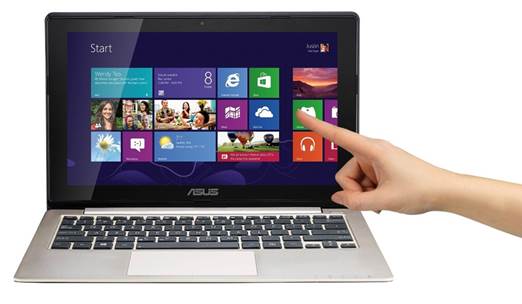
Asus
Vivobook S200E
You don’t get any fancy graphics – this is
a laptop for tasks other than gaming but again, the integrated Intel HD
Graphics 4000 is good enough to keep everything running creamy smooth without
sucking too much juice.
The Li-Polymer 38 WH batter itself consists
of two cells and is good for two weeks on standby and a maximum of five hours
constantly use. In our test it lasted fractionally over three hours when
looping video, which is about average for a device of this size. A bigger battery
would only add to the weight. As it is, it weighs in at a distinctly normal
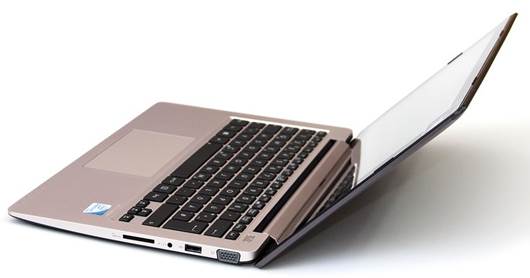
1.3kg, which we think is about right. We’re talking about premium materials
here to. The S200 is graced by a lovely brushed metal finish with an aluminium
base – you can thank Apple for pushing standards this high.
The screen is standard TN TFT fare, but
it’s decent enough. Viewing angles are what always suffer from this technology,
but this screen does pretty well, all told.
On the touch input side of things, it can
handle 10 points at once, which puts it up there with the best. Touch inputs
are registered without delay – there’s no lag when exploring Windows 8 or
swiping between menus. It’s a joy to use.
There’s no SSD on this model, mind. That’s
reserved for the much more expensive Core i7 version, which also has a full HD
IPS display and costs three times as much. Gulp.
Sound is provided by the Asus SonicMaster
brand, which is really just a fancy way of saying it’s got a sound card and
some speakers. The speakers really aren’t that bad, mind. Many laptops like
this can sound quite nasty, but the S200 does a pretty good job of putting out
sound that at least sounds nicely rounded instead of shrill and piercing. Who
needs Beats tech, eh?
All the ports
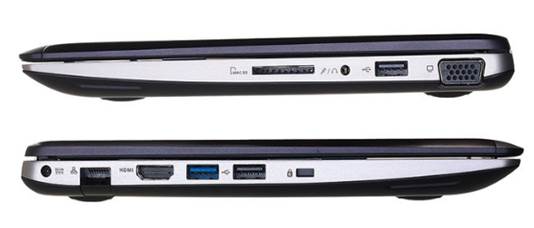
All your standard inputs and outputs are
ready and waiting for you here, with a full HDMI socket included, as well as
two USB 2.0 ports, one USB 3.0 port, VGA-out, SD card reader and Ethernet. The
only thing you might find missing is an optical disk drive, but if you want one
of those you’re going to need to choose a different class of device.
To finish the space, you’ve also got
Wireless N for Wi-Fi, Bluetooth, a 5MP front-facing camera for video chats, and
4GB RAM, which is practically enough to run Win8 twice.
The keyboard is also faultless. We’re
writing this review on it now, and we simply can’t find anything wrong with it
at all, which is often not the case with laptops of this size and price. And
we’ve been careful not to use the word ‘cheap’ there, because the only thing cheap
about this is the price. Even the trackpad is nice and responsive, and responds
well to Windows 8 touch gestures.
|
Vital
Statistics
·
Price: $675
·
Manufacturer: Asus
·
Web: http://www.asus.com
·
CPU: Intel Core i3 3217U
·
RAM: 4GB DRR3 1,333MHz
·
Graphics: Integrated Intel HD
·
Storage: 500GB
·
Screen size: 11.6in (1,366 x 768)
·
Weight: 1.6kg
Verdict
·
Features: 8/10
·
Performance: 8/10
·
Value: 10/10
|